
Atlas Systems
Atlas Workspace · A walkthrough

Small service businesses have all the software they need.
Nobody makes it work together.

Atlas connects the tools a business already pays for and runs them as one system: connected, watched, and reported, with an engineer's name on it. What follows is the workspace every Atlas client gets from day one.

Real screens · Seeded demonstration data · About four minutes
Home

Your stack by name. Green means connected.

The system map

The client's actual tools, not a generic dashboard: Dropbox, ComputerEase, Togal, Microsoft 365, CRM, phone, website. Green is connected to a real account right now.

Overnight intake

What came in by email and phone while nobody was at a desk, and what was done with it.

Needs attention

The short list for the morning, each item with a button. Website pulse and plan progress sit on the same screen.

Contractor configuration built for a commercial painting pitch. Seeded demonstration data.
Configuration · Commercial contractors

The pipeline the office will actually open

Same platform

Same tenant, monitoring, and AI layer as every Atlas client. Jobs & Bids is a configuration on top, not a rebuild. Restaurants run the same way.

Across the top

Open bids, awarded work, invoiced and outstanding with overdue called out, and how many rows need attention.

Every row

Stage, amount, estimator, next action with a date, documents, payments, job folder, follow-up. The amber dot is an overdue next action, so nobody has to remember it.

Contractor configuration built for a commercial painting pitch. Seeded demonstration data.
Configuration · Commercial contractors

A bid invitation arrives. A row is waiting.

Microsoft 365 recognizes the ITB

And drafts a row: the sender as the GC, the due date parsed from the body, the attachments linked.

An estimator accepts or dismisses

Accept puts it in the pipeline and copies the attachments into the job's Dropbox Bid folder.

Three ways in, one list

Phone intake and the website's Request a bid form land in the same table as the inbox. Nothing depends on the right person reading email that day.

Contractor configuration built for a commercial painting pitch. Seeded demonstration data.
Configuration · Commercial contractors

Submitted bids stop going quiet

One click on a submitted bid

Starts a four-email sequence to the GC estimator on days 0, 2, 7, and 14, sent from the contractor's own estimating address.

The row shows it

Follow-up running, and when the next email goes. Every send is a logged action with its outcome.

Cancel in one click

When the award lands, stop it. It does not read replies; it makes sure someone asked.

Contractor configuration built for a commercial painting pitch. Seeded demonstration data.
Atlas Intelligence

Ask what happened. It answers from your data, or says it can't.

Grounded

Answers from what Atlas already watches: uptime, systems, assistant actions, web and search traffic, reviews, shared documents. Source cited every time.

Refuses to guess

Asked about data that isn't in the workspace, it declines instead of inventing an answer.

Escalation built in

When a human should take over, it hands off to your engineer in the same bubble, one tab away.

Sample workspace. "Calder Street Advisors" is fictional demonstration data.
Reports · The service-level agreement

Promises measured, not promised

Side by side

Every written promise next to its measured result: success rate, uptime, first-reply time, on-time reports.

Incidents with timestamps

When a connected system failed a check, the client was notified in one minute and can see the clock.

Self-enforcing

Each missed promise in a month credits 10% of that month's fee, up to 30%. Applied automatically, no asking.

Sample workspace. "Calder Street Advisors" is fictional demonstration data.
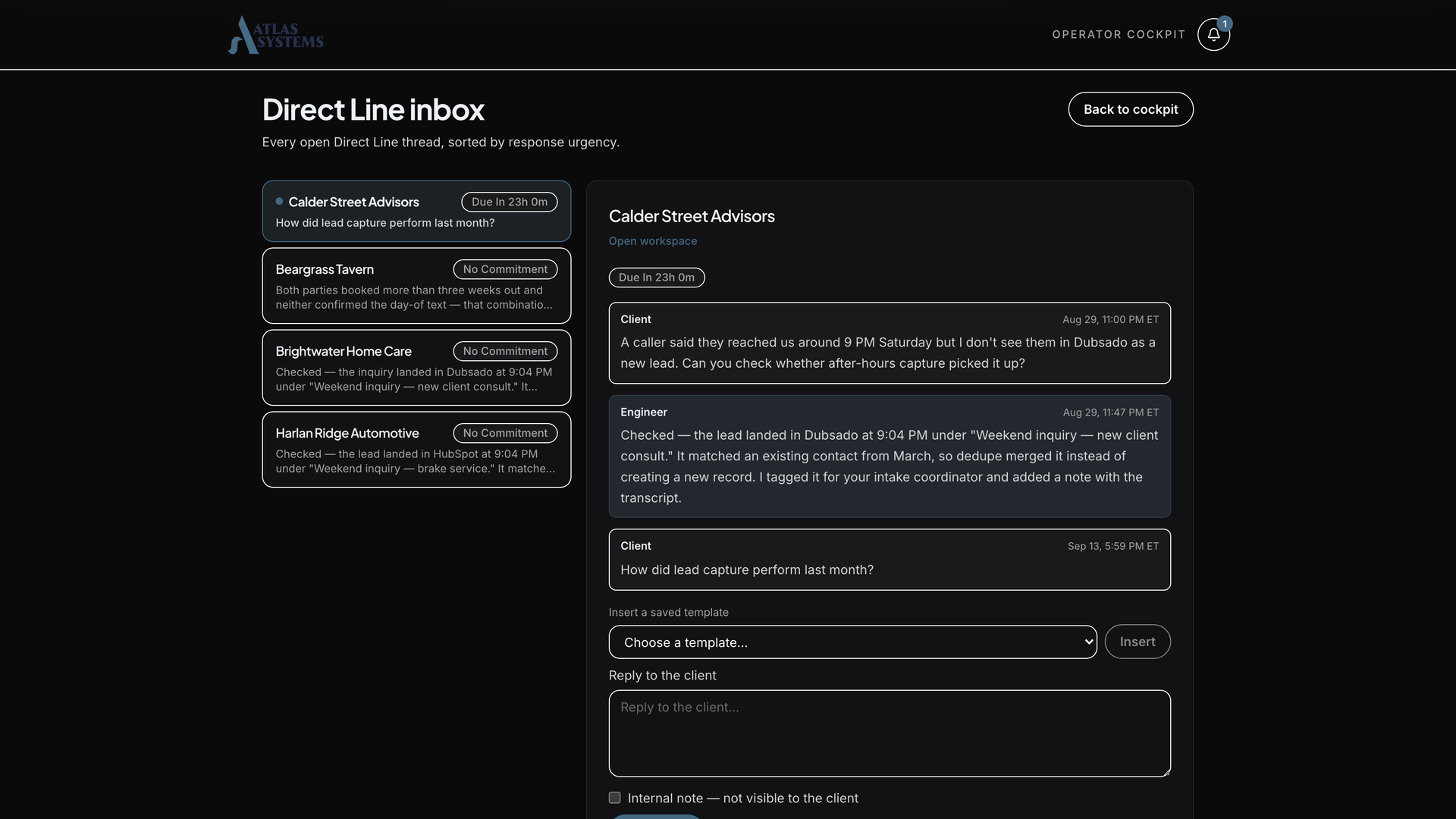
Direct Line

A named engineer, not a ticket queue

Atlas operator inbox showing a client message with its response-time clock
From any page

Clients message their engineer from the same bubble, and questions land with full account context.

A clock on our side

This is Atlas's view: every client message sits in our inbox with its response commitment counting down.

Inside your SLA

Replies are a written commitment with the same credit teeth as every other promise.

Atlas operator view. "Calder Street Advisors" is fictional demonstration data.
Integrations

If your business runs it, Atlas can reach it

Connected and monitored

Sign in once, we watch it from then on

HubSpot, Calendly, Google (Analytics, Search Console, Business Profile), QuickBooks Online, Dropbox, Microsoft 365, and Dotloop connect with credentials you grant. Each is health-checked continuously, uptime sits on your SLA, and access is auditable and revocable.

Channels built in

How customers reach you

Web chat and voice assistant (Synthflow), phone intake, SMS follow-up with opt-out compliance built in (Twilio), and email, all feeding the same measured action pipeline.

Imports and hooks

When the tool has no API

Togal bid logs and ComputerEase receivables import from the export the office already runs. Zapier catch hooks and any webhook consumer receive events like lead.created, and quiet or failing hooks surface in system health. An MLS listing feed runs behind a live real-estate client site today.

Atlas Systems
Every action engineered.
Every promise measured.
Every miss credited.

Want to see it work on you? The chat on atlasys.io is the same intake every client gets. It answers, qualifies, and books time with our team directly. Ask it anything first; that's rather the point.

Want the full story? How we make your business run like one system →

Open atlasys.io ↗
A real recording from atlasys.io. The visitor is scripted, the assistant isn't.
← → navigate · F fullscreen · click video to replay

Presenter notes